Version-Control-Git-Teaching-Notes
Staging Area
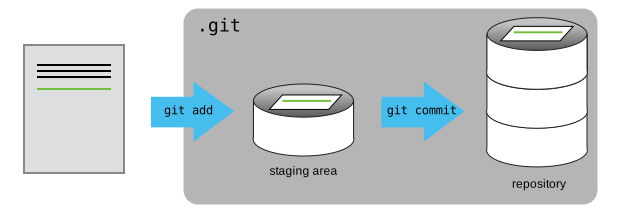
If you think of Git as taking snapshots of changes over the life of a project, git add specifies what will go in a snapshot (putting things in the staging area), and git commit then actually takes the snapshot, and makes a permanent record of it (as a commit). If you don’t have anything staged when you type git commit, Git will prompt you to use git commit -a or git commit --all, which is kind of like gathering everyone to take a group photo! However, it’s almost always better to explicitly add things to the staging area, because you might commit changes you forgot you made. (Going back to the group photo simile, you might get an extra with incomplete makeup walking on the stage for the picture because you used -a!) Try to stage things manually, or you might find yourself searching for “git undo commit” more than you would like!